HUMAN INTERVENTION_
Redesigning Navigation for SysEng's SEC-HUB

System Engineering Concept
Domain:
Industrial Operations, Enterprise SaaS
Deliverable:
Scalable ad landing page system
Scope:
Feature discovery workshop, Interaction Design, Usability Testing
Scale:
Enterprise clients including Airbus, Aalborb Forsyning, Ørsted
Overview
Systems Engineering Concept had built a web application for managing relational databases of industrial systems, the kind of tool that helps Airbus engineers track how thousands of components connect to form aircraft subsystems. But after three years of use, the navigation had become a bottleneck that required hours of onboarding for new users and regularly sent existing users to support for basic functions.
I was brought in through Monterail's embedded team to redesign the entire navigation system and add dashboard data visualization capabilities for a product so technically complex that understanding it required learning industrial engineering concepts I'd never encountered. I led a week-long feature discovery workshop with both the client and development teams, arriving with wireframes to give everyone a concrete starting point for iteration rather than asking them to create from nothing, and the collaborative process produced consensus on a navigation architecture that we translated into production-ready designs.
User testing validated the approach, showing general appreciation for easier movement through the application and a 60% average reduction in clicks required for core workflows like creating projects, building relational analyses, managing team access, and archiving, proof that I could enter an unfamiliar technical domain, learn the underlying systems, and create measurable impact through design.
Dashboard Data Visualization

Adding a graph allows the user to show all functional systems in a factory or plant, their related technical systems, and the progress of these systems.

In this application, an owner is an individual who has the main responsibility for a specific system or systems (e.g. water supply system). The graph shows the overview of each owner’s interface progress. The interface simply refers to the relation between two systems (e.g. water supply vs. flow generation system).

Here’s an illustration of a graph that shows different revisions, which illustrates the overall progress that has been made throughout a project.

Once a graph is created, the user can resize and reposition it. They’re able to edit, print, and delete the graph by unfolding the menu in the graph window.
SIMO (The Systems Integration Monitor)
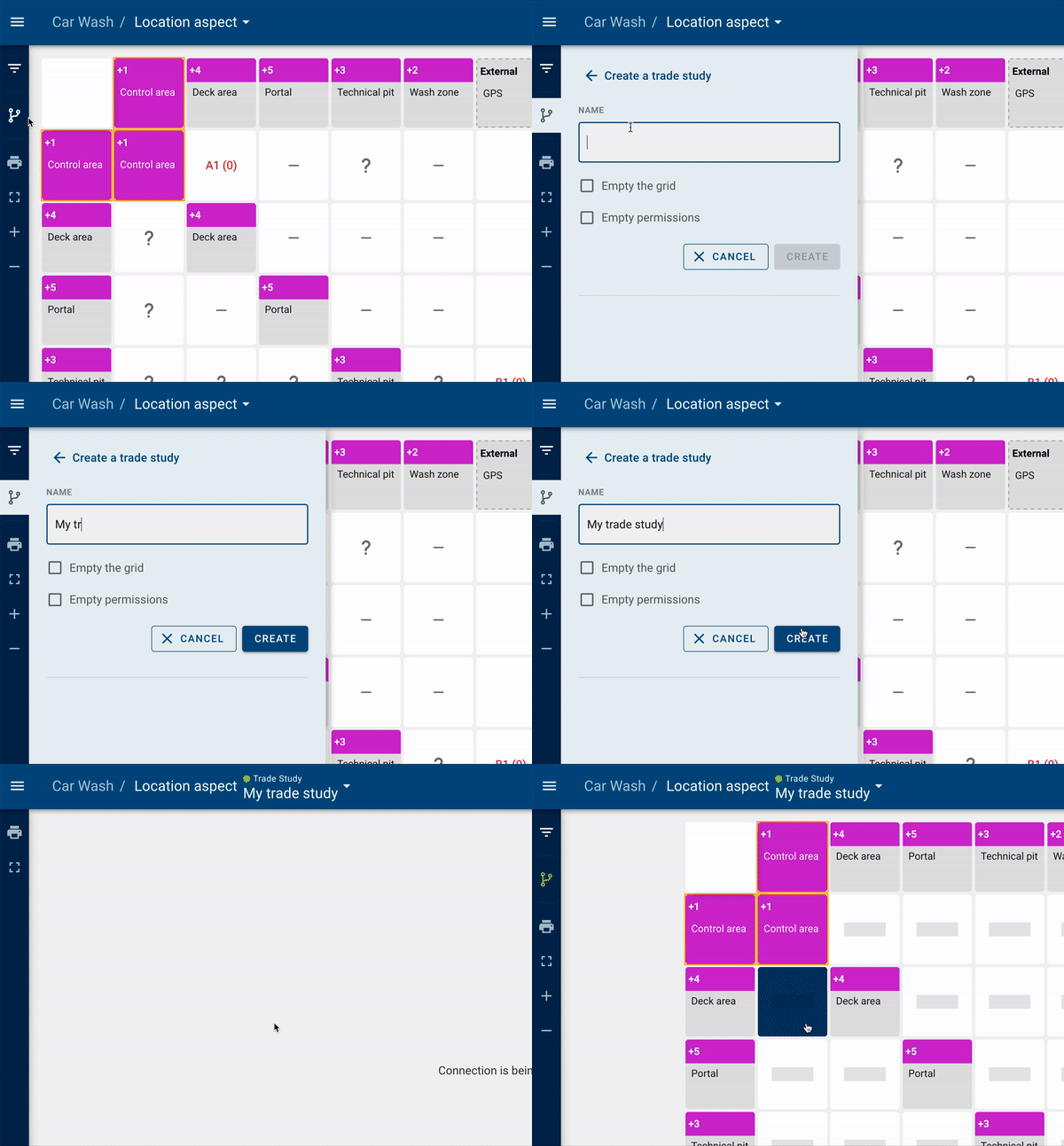
The Systems Integration Monitor (SIMO) is a module that is used to define interfaces between systems within a context. The context may be functional, product, location or type. Each system may have multiple contexts. Above is the flow for creating a Trade Study, which is essentially a copy of the user’s SIMO grid for the purposes of using it as basis to compare the progress of the original SIMO.
CORE (Common Reference Editor)

The Common Reference Editor (CORE) is a module where you design your structure and classify systems. As seen above, the user is able to edit a system either by changing the name, changing the number, or moving the system.

The user is able to delete the system as well. If a system contains sub-elements, these get deleted as well. As an extra precaution, an 8-second cancel option appears to offer the user a chance to undo the cancellation.